Why Is My Business Not Showing on Google? 7 Checks, and What 411 Shropshire Websites Showed
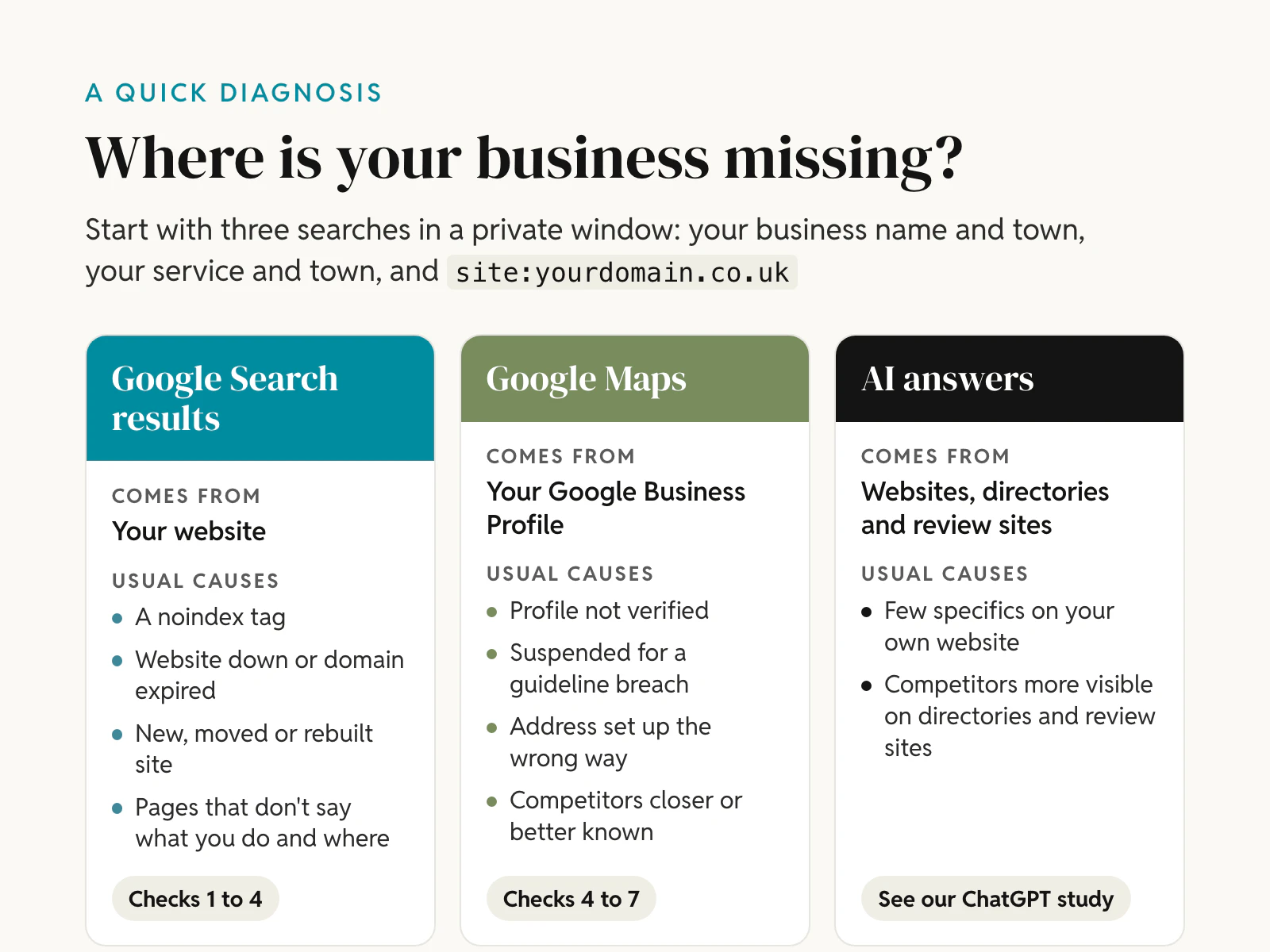
If your business is not showing on Google, first work out where it is missing. Google's ordinary search results come mostly from your website. The map results come from your Google Business Profile. Each has its own causes, and a business can appear in one while it is missing from the other. On 10 November 2026 we checked the home pages of 411 Shropshire businesses that all have a Google Maps listing. Eleven of the 402 home pages that loaded told Google not to index them, so those websites cannot appear in Google's search results, however good they are.
This guide gives seven checks in the order we run them for a client. The quick ones come first, then the ones that take longer to fix. Each check says what our Shropshire data found and what Google's own documentation says.
In short
- Find where you are missing: search your business name, then your service and town, then
site:yourdomain.co.uk. Each result points to a different cause. - A hidden "do not index" rule is the first thing to rule out: 11 of 402 Shropshire home pages carried one. Six had the exact tag WordPress adds when "Discourage search engines from indexing this site" is ticked.
- Some websites have quietly gone: 5 of 411 Maps listings sent customers to an expired domain or to a website builder's own home page.
- Maps has its own rules: a profile that is unverified, suspended or set up with the wrong kind of address will not show. Ranking then depends on relevance, distance and prominence.
- You cannot pay for a better map position: Google says so. Fixing the basics, earning reviews and making your pages locally relevant is the route.
First, find out where you are missing
Run three searches in a private browser window, so your own search history does not colour the results:
- Your business name and town. If you do not appear even for your own name, the problem is basic: an indexing block, a website that is down, or a missing or suspended profile.
- Your service and town, for example "electrician Ludlow". This is how most new customers search. If you show for your name but not here, Google does not yet see you as the most relevant or prominent choice.
site:yourdomain.co.ukwith your own domain. Google says this returns a list of indexed and serving URLs. The list is not always complete, but if it returns nothing at all, your site is probably not in Google's index.
| What you see | What it usually means | Start with |
|---|---|---|
site: returns nothing | Google has not indexed your website | Checks 1 to 3 |
| Your website shows for your name, not for your service and town | Your pages are not relevant or prominent enough for that search | Checks 4 and 7 |
| No map listing even for your name | No verified Business Profile, or a suspended one | Checks 5 and 6 |
| Map listing for your name, not for your service and town | Relevance, distance or prominence | Checks 4 and 7 |
| On Google, but not in ChatGPT or other AI answers | AI assistants lean on other sources | The AI section below |
If you have Google Search Console, the URL Inspection tool answers the website question directly. It says whether a page is on Google and, if not, why. Google notes that "URL is on Google" means the page is eligible to appear, not that it is guaranteed to.
What we found in 411 Shropshire business websites
We took 411 independent businesses in eight sectors across Shrewsbury, Telford, Oswestry, Bridgnorth, Ludlow, Market Drayton and Whitchurch. The sectors were plumbers, electricians, accountants, solicitors, dentists, hairdressers, estate agents and restaurants. Every business was found through Google Maps, and every listing linked to a website. On 10 November 2026 we loaded each home page with our own script and read what it tells search engines.
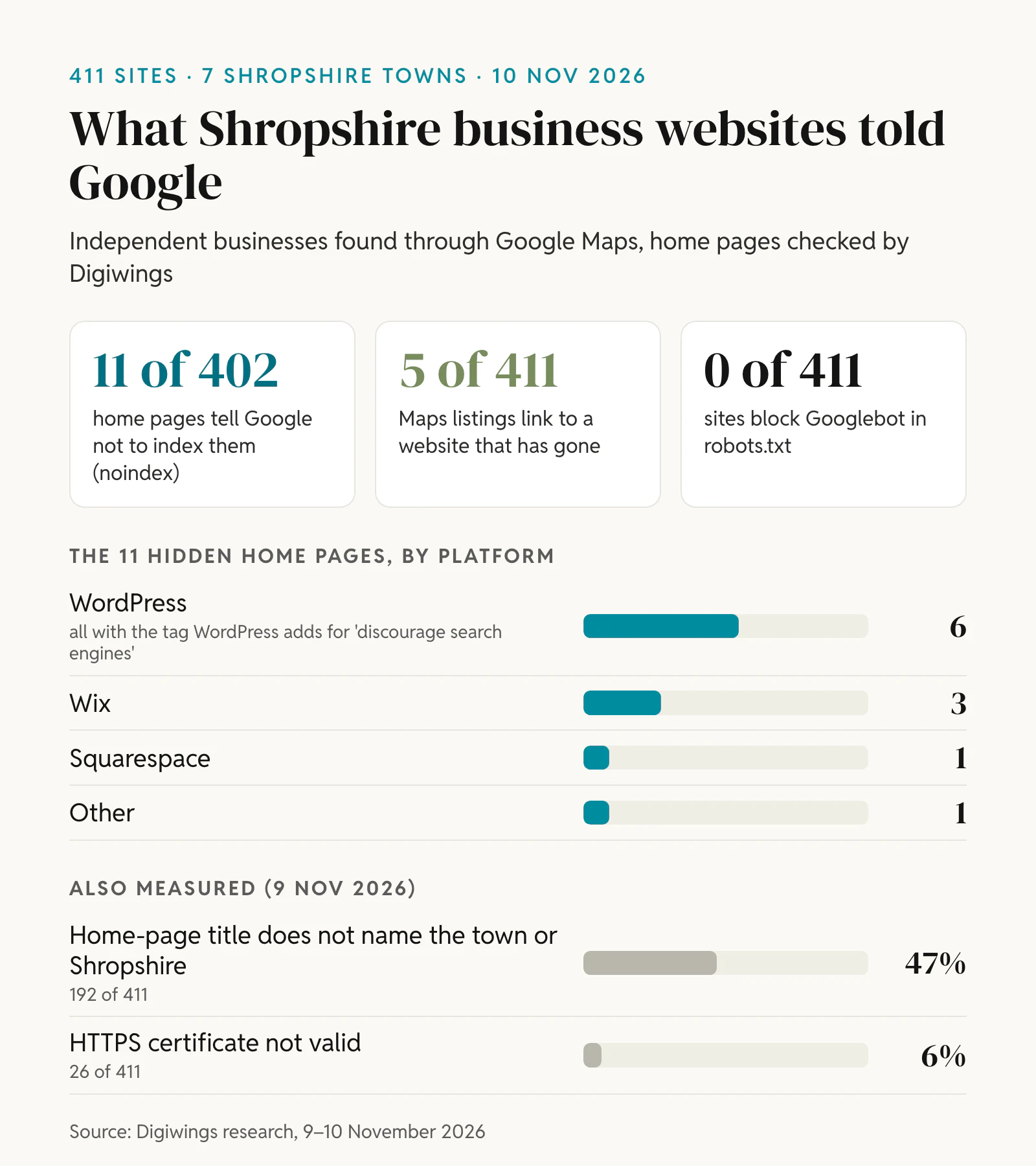
- 11 of 402 home pages (2.7%) said "noindex". Each of these businesses has a Maps listing that sends customers to a website Google has been told to keep out of its results. They were spread across all seven towns and six of the eight sectors.
- Six of the 11 were WordPress sites carrying the tag WordPress itself outputs when "Discourage search engines from indexing this site" is ticked. A maintenance or "coming soon" plugin can output the same tag. Three were Wix sites, one was Squarespace and one was another platform.
- 5 of 411 listings pointed to a website that has gone. Two domains now redirect to a page offering the name for sale. Three redirect to the website builder's own home page, which usually means the site or its subscription has ended.
- No site blocked Googlebot in robots.txt. In our sample, the robots.txt file was never the reason a site was hidden.
- 192 of 411 home-page titles (47%) did not name the town or Shropshire. That does not hide a site. It does make it harder for Google to match the page to a "service and town" search.
The platform mix was WordPress 190 sites (46%), Wix 43 (10%), Squarespace 23 (6%), GoDaddy 14 (3%) and other platforms 22 (5%). The remaining 119 were custom-built, could not be identified or did not load. No single platform is to blame: every major one has a setting that can hide a site.
Check 1: Is your website telling Google to stay away?
A noindex rule tells Google not to show a page in its results. Google's documentation on noindex says it can be set with a meta tag in the page or with an HTTP response header (X-Robots-Tag). It is the right tool for pages you want kept out of search, such as a thank-you page. On a home page it is almost always a mistake, usually a setting left on while the site was being built.
To check your own site:
- Open your home page, view the page source (Ctrl+U in Chrome on Windows, Option+Cmd+U on a Mac) and search for "noindex". Check a couple of your main service pages too.
- In Search Console, the Page indexing report lists affected pages under "URL marked 'noindex'". Google's explanation is that it found a noindex directive when it tried to index the page, so it did not index it.
Where the setting usually lives:
- WordPress: Settings, then Reading, then "Search engine visibility". Untick "Discourage search engines from indexing this site". The WordPress documentation says the box asks search engines not to index the site. It does not block access, but Google respects it. If the box is already clear, look for a maintenance, "coming soon" or SEO plugin that sets noindex.
- Wix: in your dashboard's SEO settings, the "Let search engines index your site" toggle must be on. Wix's help article explains where to find it. Pages can also be hidden one at a time.
- Squarespace and other builders: look in the SEO or site visibility settings for any option that hides the site or a page from search engines. Also check that the site is not set to private or protected by a password.
Once the tag has gone, make sure robots.txt does not block the page. Google can only see that the noindex has been removed if it is allowed to crawl the page. Then use "Test live URL" and "Request indexing" in URL Inspection. Google says indexing "typically takes only a day or so, but can take much longer in some cases", and that a request does not guarantee the page will be indexed.
Check 2: Is your website still live, on the address you think?
Your Business Profile keeps sending people to the web address you gave it, even after the site behind it has gone. Five of the 411 listings in our sample did exactly that. Click the website link on your own listing and see where it lands.
The most common reason a site disappears is an expired domain. For .uk domains, Nominet's expiry process works like this:
- Days 1 to 30 after expiry: the domain keeps working fully and can be renewed.
- Days 30 to 90: it no longer resolves, so your website and any email on that domain stop working. It can still be renewed.
- Days 90 to 95: it can no longer be renewed. After that it drops and anyone can register it.
Three habits prevent most of this. Make sure the domain is registered to your business, not to a former web designer. Keep the contact email on the account up to date, because that is where renewal reminders go. Turn on auto-renew with a card that will not expire soon. The same applies to website builder subscriptions: when the payment fails, the site goes offline.
If you have moved to a new domain, update the website link on your Business Profile as well. Sending visitors through an old address that redirects works, but only while you keep paying for the old domain.
Check 3: Is the site new, or has it moved or been rebuilt?
Google says that it can take a few weeks to notice a new site or changes to an existing one. A link from your Business Profile helps Google find a new site. Submitting a sitemap in Search Console helps too.
If your site was showing and then stopped, a rebuild or move is the usual suspect. The commonest problems we see:
- The noindex setting from the development site was copied to the live site (Check 1).
- Old page addresses were not redirected to the new ones, so links and rankings were lost.
- Pages that brought in visitors were removed or merged without a plan.
Our free website migration checklist covers each of these. Google's guide to debugging drops in search traffic lists the other causes to rule out: technical errors, security issues such as malware, manual actions after a human review, site moves and algorithm updates. Search Console has a report for manual actions and one for security issues, and both are worth a look.
Check 4: Does Google know what you do and where?
Google's Business Profile help says local results are mainly based on relevance, distance and prominence. Relevance is how well your profile matches what someone searched for. Your website does the same job for the ordinary results.
In our data, 47% of home-page titles did not mention the town or Shropshire. A title such as "Emergency plumber in Telford | [Business name]" tells Google and the searcher what you do and where in one line. Beyond the title:
- Give each main service its own page, rather than listing everything on the home page.
- Name the towns and villages you cover in the text of your pages. This matters most if you work from home and keep your address hidden.
- Fill in your Business Profile completely: category, services, opening hours, a description and photos.
Check 5: Is your Google Business Profile verified and set up correctly?
Google says verifying tells it that you are authorised to represent the business, "so it's more likely to show up in search results". According to its verification guide, the methods include phone or text, email, a live video call, a video recording and a postcard. Google decides which ones you are offered, and a review can take up to five working days.
Two set-up mistakes cause many of the problems we see:
- Showing an address you do not serve customers at. If customers do not come to you, Google asks you to remove the address and set service areas instead. You can add up to 20, by town or postcode, and the whole area should be within about two hours' drive of your base.
- Using an address that is not eligible. Google's guidelines say a virtual office you do not operate from is not eligible, and remote PO boxes or mailboxes are not acceptable.
Check 6: Has your profile been suspended?
A suspended profile disappears from Maps. Google's guidelines give one common trigger in plain words: "Including unnecessary information in your business name isn't permitted, and could result in the suspension of your Business Profile." Adding "Best Plumber Shrewsbury" to a name is the classic example. The address rules in Check 5 are another frequent cause.
Google's guide to suspended profiles sets out the fix:
- Check the profile against the guidelines and correct anything that breaks them.
- Gather evidence such as your business registration, a licence or a utility bill, with the same name and address as the profile.
- Submit an appeal with the appeals tool.
Two warnings from the same page: "Do not create a new Business Profile for the same business", and "Appeals can only be submitted once." Prepare your evidence before you appeal.
Check 7: Are competitors simply closer or better known?
If everything above is in order, you are probably being outranked rather than hidden. Distance is how far each business is from the person searching. You cannot change it, which is why someone searching in Oswestry tends to see Oswestry businesses first. Prominence is how well known a business is. Google says it draws on information such as how many websites link to you and how many reviews you have, and that "more reviews and positive ratings can help your business's local ranking."
Google is also clear that "there's no way to request or pay for a better local ranking on Google." Ads are a separate product. The work that moves you up is steady: specific pages for your services and towns, reviews from real customers and mentions on local sites. This is the work our SEO and GEO retainers cover, and our pages for Shrewsbury, Telford, Oswestry, Bridgnorth, Ludlow, Market Drayton and Whitchurch show what it looks like in each town.
What about ChatGPT and other AI answers?
Showing on Google does not guarantee a place in AI answers. When we asked ChatGPT and Gemini 112 local questions about the same seven towns, only 130 of 435 business recommendations (30%) cited the business's own website. The rest leaned on directories, review platforms or no source at all. Fix the checks above first: a website that is hidden or offline cannot help you anywhere. Then read what 112 AI answers showed in Shropshire. If you are a tradesperson, our look at Checkatrade and AI answers covers the platforms that dominate your trade.
How can Digiwings help?
We build websites and run local SEO for Shropshire businesses from our studio in Shrewsbury. Send us your website and we will run these seven checks, free of charge, and tell you what we find. You can also try our free SEO and AI readiness check yourself, or see our web design packages if the site itself needs replacing.
Frequently asked questions
Why is my business not showing on Google Maps?
Usually because the Business Profile is not verified, has been suspended, or uses an address Google does not accept, such as a virtual office. If the profile is live, competitors may simply be closer to the searcher or better known. Google says local results are mainly based on relevance, distance and prominence.
Why is my business not showing on Google after verification?
Google says a verification review can take up to five working days. After that, a verified profile is more likely to show, but it still has to compete on relevance, distance and prominence. Search for your business name first. If you appear for your name but not for your service and town, the issue is ranking, not visibility.
Why is my website not showing up on Google anymore?
Check for a noindex tag added during a redesign or update, an expired domain or a lapsed website builder subscription first. Then look at site moves without redirects, security issues and manual actions in Search Console. In our Shropshire check, 11 of 402 home pages carried a noindex tag and 5 of 411 listings pointed to a website that had gone.
How long does it take for a new website to show on Google?
Google says it can take a few weeks to notice a new site. You can speed this up by adding the site to Search Console, submitting a sitemap and requesting indexing for the home page. Linking to the site from your Business Profile also helps Google find it.
Can I pay Google to show my business higher on Maps?
No. Google states that there is no way to request or pay for a better local ranking. Ads are a separate, paid product. Your place in the free map results depends on relevance, distance and prominence, including your reviews.
Why is my Wix or WordPress website not showing on Google?
Both platforms have a setting that hides the whole site. In WordPress it is "Discourage search engines from indexing this site" under Settings, then Reading. In Wix it is the "Let search engines index your site" toggle in the SEO settings. In our Shropshire check, six WordPress sites and three Wix sites had their home page hidden this way.
How we checked
The 411 businesses are the same sample as in our ChatGPT study: independent businesses in eight sectors whose Google Maps listing gave one of the seven towns as the postal town and linked to a website. National chains were removed. On 10 November 2026 our script requested each home page, read the HTML and response headers the server sent, and recorded three things: any noindex rule in a robots meta tag or the X-Robots-Tag header, where the address finally landed after redirects, and the website platform, using public code signatures. The title, HTTPS and robots.txt figures come from our check on 9 November 2026.
The limits matter. We checked home pages only, so a noindex on other pages was not counted. We did not run the pages' scripts, so a noindex added by JavaScript would be missed. Six home pages blocked our check or returned an error, and three did not load at all; they are left out of the noindex count. We did not test whether each site is actually in Google's index, which needs the owner's Search Console. Platform signatures can miss some sites. We publish only totals, never the names of the businesses. The totals are in our indexing check data (CSV, CC BY 4.0).
Sources
Our own data was collected on 9 and 10 November 2026. Google, platform and Nominet pages were checked on 10 November 2026.
- Digiwings, Indexing check of 411 Shropshire business websites, November 2026 (CSV, CC BY 4.0), and Local search readiness, November 2026 (CSV, CC BY 4.0).
- Google Search Central, Block Search indexing with noindex.
- Google Search Central, How to use the site: search operator.
- Google Search Central, Get your website on Google.
- Google Search Central, Debugging drops in Google Search traffic.
- Search Console Help, URL Inspection tool and Page indexing report.
- Google Business Profile Help, Tips to improve your local ranking on Google.
- Google Business Profile Help, Verify your business on Google.
- Google Business Profile Help, Manage your service areas for service-area and hybrid businesses.
- Google Business Profile Help, Guidelines for representing your business on Google.
- Google Business Profile Help, Fix suspended or disabled profiles.
- WordPress, Settings Reading screen, and WordPress developer reference, wp_robots_noindex().
- Wix Help Center, Managing search engine indexing for your site.
- Nominet, Domain expiry process and introduction of drop lists for .UK.
Illustration and charts: Digiwings.