Google Business Profile Suspended? Why It Happens and How to Fix It (UK Guide)
If your Google Business Profile has been suspended, Google believes it breaks one of its guidelines. To get it back, find out which rule the appeals tool says you broke, fix that problem on the profile, then submit one appeal with documents that show your real business name and address. Do not create a new profile while you wait, and if your whole Google Account has been restricted, appeal the account first: Google's process is to lift the account restriction before you appeal the profile.
Google's guidelines point to a handful of usual causes: extra words in the business name, an address customers cannot visit, a second profile for the same business, or reviews Google thinks were bought or incentivised. This guide covers how to tell which kind of suspension you have, what evidence UK businesses can send, and how to avoid it happening again.
In short
- Find the reason first: the Google Business Profile appeals tool shows the restricted profile, the reason and a link to the policy.
- Fix, then appeal once: correct the problem before you appeal, and do not open a new profile while the appeal is under review.
- Have evidence ready: Google accepts business registration, licences, tax certificates and utility bills. Once you open the evidence form, you have 60 minutes to submit it.
- Account restrictions come first: if your Google Account is restricted, every profile it manages is suspended until the account appeal succeeds.
- A common risk in Shropshire: 48 of 794 local profile names we checked (6%) had a description, service or town added after a dash or bar.
Why was my Google Business Profile suspended?
Google suspends or disables profiles that it believes do not follow its guidelines for representing a business. Google does not always explain the detail, but its guidelines point to the usual causes:
- Extra words in the business name. Your profile name must match your real-world name as it appears on your signs, website and stationery. Google says adding unnecessary information, such as a service, a town or a slogan, is not permitted and could result in suspension.
- An address customers cannot use. PO boxes and virtual offices are not eligible. An office in a co-working space only counts if it has clear signage and is staffed during opening hours.
- A home address on a service-area business. If you travel to customers, such as a plumber working from home, Google says you should hide your address and show a service area instead.
- More than one profile for one business. Google allows one profile per location, and says more than one can cause problems with how your business shows on Maps and Search.
- A service area that is too wide. Google says it should not extend beyond about two hours' driving time from where you are based.
- Fake or incentivised reviews. Breaking Google's fake engagement policy can lead to reviews being removed and the profile being restricted. Our guide to getting more Google reviews legally sets out what is allowed.
- An ineligible business. A profile is for a business that customers visit, or that travels to customers. A purely online business does not qualify.
What Shropshire profile names show
Of 794 Shropshire business profiles that came up in Google searches on 9 November 2026, 48 (6%) had a name made of a business name plus a description after a dash, bar or colon, such as a service, a town or a list of what they offer. Some of those may be how the business really presents its name, which is allowed. But it is the pattern Google's name rules target, so if your profile looks like that and your signs do not, change it before Google does. Our analysis of 39 Google Maps searches explains why the temptation exists, and why it is not worth the risk.
Which kind of suspension do you have?
"Suspended" can mean three different things, and each one is fixed in a different place. Check which one you have before you do anything else.
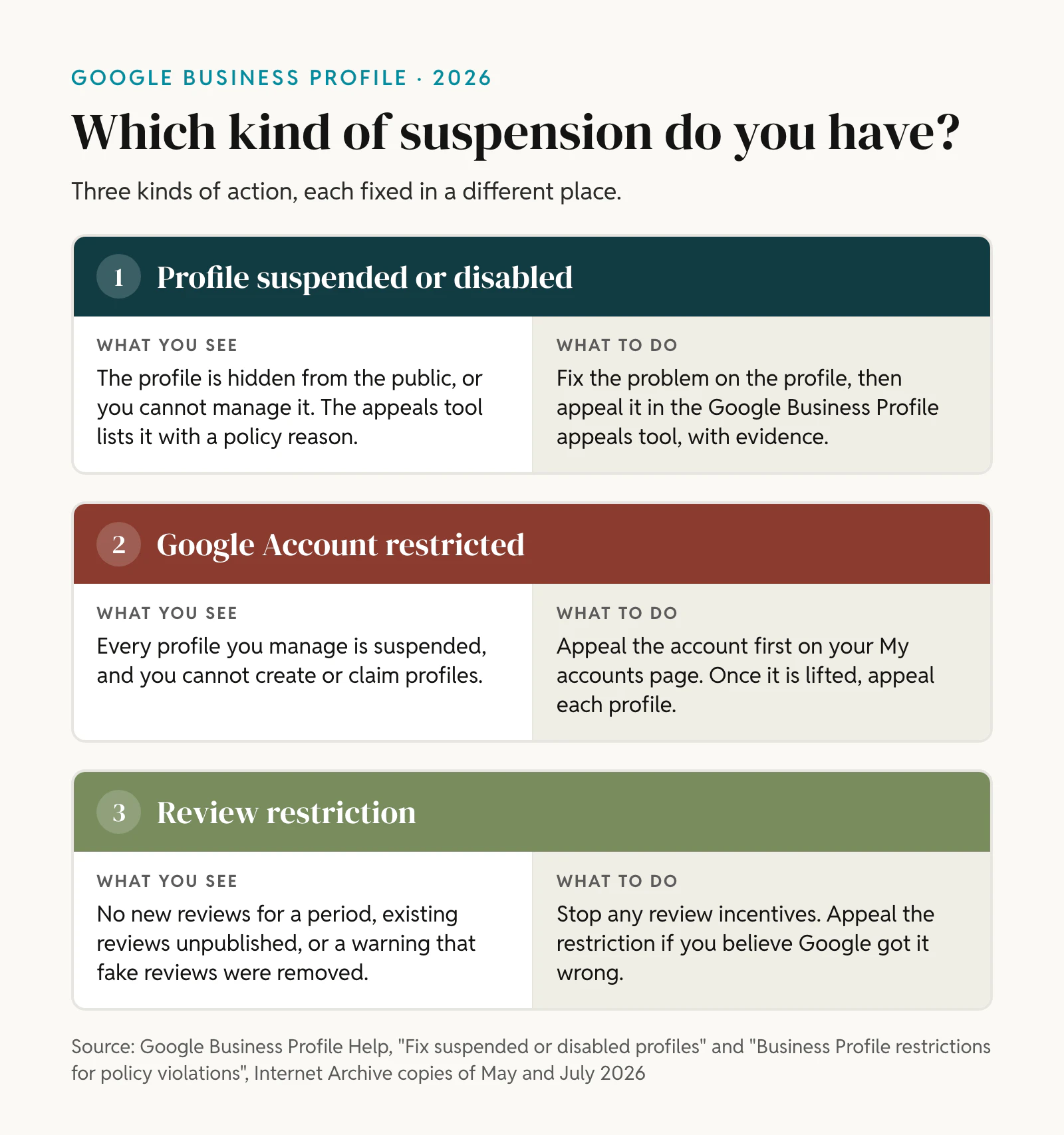
- Profile suspended or disabled: the profile is hidden or you cannot manage it. Google's appeals tool lists it with the reason. You fix and appeal the profile.
- Google Account restricted: Google says that when an account is restricted, the profiles it manages are suspended and you cannot create or claim others. You appeal the account first, from your Google Account's My accounts page, and then each profile.
- Review restriction: for breaches of the fake engagement policy, Google may stop new reviews for a set period, unpublish existing ones, or show a warning that fake reviews were removed. It emails the owner first, and you can appeal.
A profile that only needs verifying, or whose edits are "pending", is not suspended. That is a separate process, covered in our guide to why a business is not showing on Google.
How to fix a suspended Google Business Profile
- Read the email and open the appeals tool. Sign in with the Google Account that manages the profile, open the Google Business Profile appeals tool and select the profile. It shows the restriction, the reason and a link to the policy.
- Check whether your account is restricted. If it is, appeal the account first from My accounts. Google's process is to lift the account restriction first, then appeal the profile.
- Fix the cause. Remove extra words from the name, hide a home address, correct the category, remove a duplicate, or stop any review incentives. Google tells you to make sure the profile follows all the guidelines before you appeal.
- Gather your evidence before you start. Google says that once you open the evidence form, you must submit it within 60 minutes or it will not be attached. Have the documents scanned and ready.
- Submit one appeal. Select Submit Appeal, then Add evidence, upload your documents and add a short, factual explanation. Do not create a new profile for the same business while it is under review.
- Wait for the email. Google sends the decision by email. The appeals tool shows the status as Submitted, Approved, Not approved, Can't be appealed or Eligible for appeal. Google does not publish how long a review takes.
- If it is refused, ask for one more review. Google may do an additional review of a denied request. Use it to send evidence you did not include the first time.
What evidence can UK businesses send?
Google lists four kinds of evidence that can strengthen an appeal: official business registration, a business licence, tax certificates, and utility bills for the business, such as electricity, phone, water or internet. Its main tip is that the business name and address on every document must match the profile you are appealing.
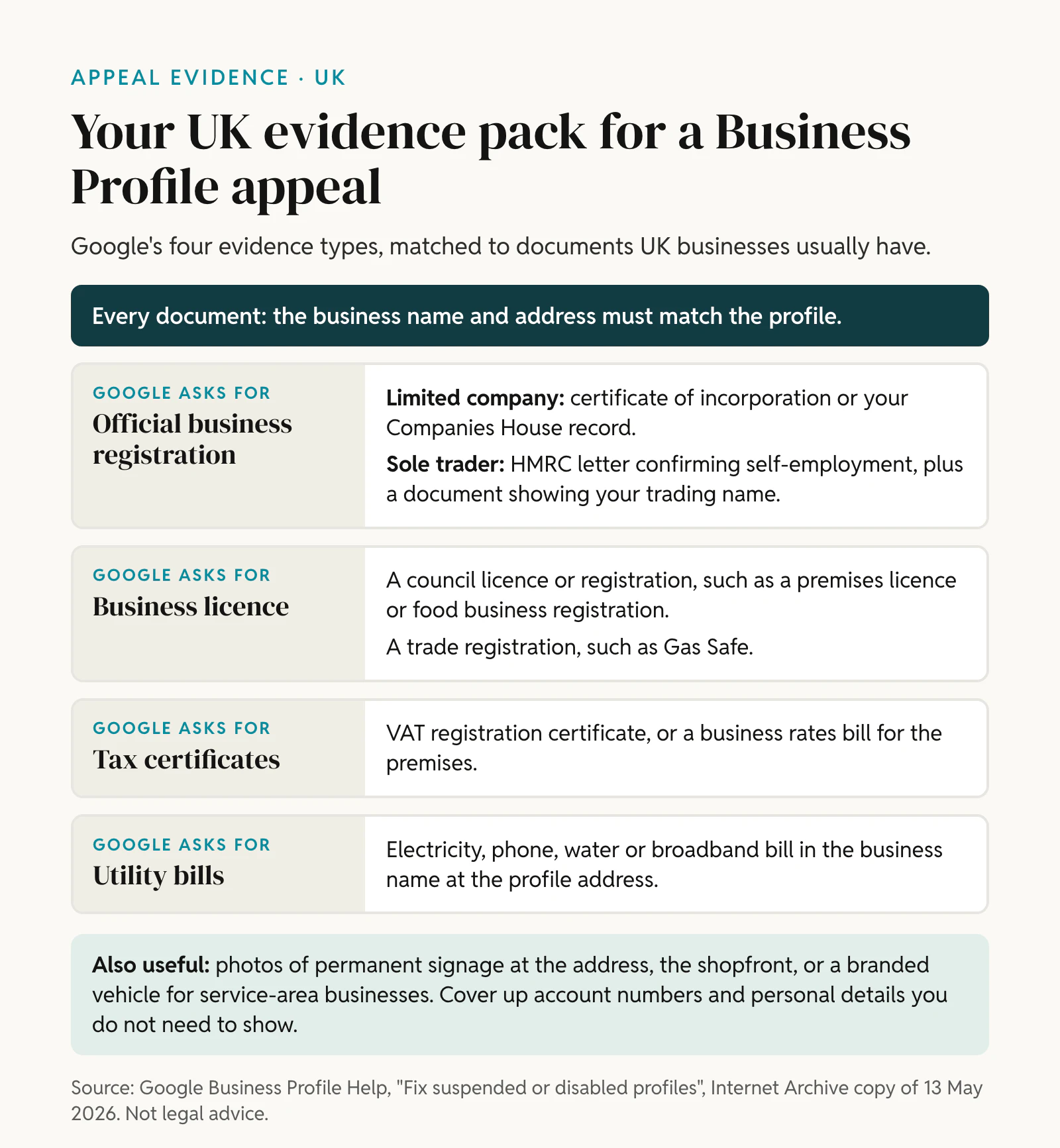
| Google asks for | UK documents that fit |
|---|---|
| Official business registration | Limited company: certificate of incorporation, or your Companies House record. Sole trader: an HMRC letter confirming you are registered as self-employed, plus a document showing your trading name. |
| Business licence | A council licence or registration, such as a premises licence or food business registration, or a trade registration such as Gas Safe. |
| Tax certificates | VAT registration certificate, or a business rates bill for the premises. |
| Utility bills | Electricity, phone, water or broadband bill in the business name at the profile address. |
Photos of permanent signage at the address, of your shopfront or of a branded vehicle can also help, because Google's guidelines expect businesses that show an address to have permanent signage there. Send only what you need, and cover up account numbers or personal details you do not have to show.
The hardest cases are home-based sole traders, whose documents often show a home address and a personal name. If that is you, make sure the profile is set up as a service-area business with the address hidden, and send documents that link your trading name to you.
How to avoid a suspension
- Use your real-world name, exactly as it appears on your signs and invoices.
- Keep one profile per location, and remove old or duplicate ones.
- Use a real address that customers can visit, or hide it and set a service area if you travel to them.
- Keep the service area realistic, within about two hours' drive.
- Never pay for, filter or incentivise reviews.
- Control who manages the profile. Give access to as few people as possible, remove former staff and suppliers, and keep the owner as a business account you control.
- Keep the website consistent with the profile: the same name, address and phone number.
How can Digiwings help?
We set up and look after Google Business Profiles for local businesses as part of our Local SEO service, from £395 a month. If your profile has been suspended, send us the business name and the email Google sent you. We will tell you, free of charge, what we think caused it and what an appeal would need, and we can prepare the fixes and the evidence with you. You can also read about our SEO and GEO services or our local pages for Shrewsbury, Telford and Oswestry.
Frequently asked questions
How do I fix a suspended Google Business Profile?
Open the Google Business Profile appeals tool to see the reason, fix that problem on the profile, then submit one appeal with documents that show your business name and address. If your Google Account is restricted, appeal the account first.
Why was my Google Business Profile suspended for no reason?
There is usually a reason, even if the email does not spell it out. Common causes are extra words in the business name, an ineligible address, a duplicate profile, a home address on a service-area business, or reviews Google believes were incentivised. The appeals tool links to the policy involved.
How long does a Google Business Profile appeal take?
Google does not publish a timescale. It sends the decision by email, and you can check the status in the appeals tool. Do not submit repeated appeals or create a new profile while one is under review.
What evidence does Google accept for a Business Profile appeal?
Official business registration, a business licence, tax certificates and utility bills for the business. The business name and address on each document should match the profile. You must submit the evidence within 60 minutes of opening the form.
Should I create a new Google Business Profile if mine is suspended?
No. Google says not to create a new profile for the same business while an appeal is under review. A duplicate breaks the one-profile-per-location rule and can make things worse.
What happens to my reviews if my profile is suspended?
While a profile is removed, the public cannot see it. Google says that when it reinstates a profile, it reinstates the profile and its owners and managers. Separate review restrictions can unpublish reviews for a set period.
How we checked
We read Google's help pages on suspended profiles, restrictions and business guidelines through Internet Archive copies made between May and November 2026, because Google's help centre blocks automated access. For the name check, we took the 794 Shropshire businesses returned by Google's Places API Text Search on 9 November 2026 for eight business types in seven towns, and counted names in which a dash, bar or colon was followed by a service, a town or a description. We did not check how each business presents its name on its signs, so the count shows a pattern, not breaches. We publish totals only, never business names.
Sources
- Google Business Profile Help, Fix suspended or disabled profiles, checked through the Internet Archive copy of 13 May 2026.
- Google Business Profile Help, Business Profile restrictions for policy violations, checked through the Internet Archive copy of 19 July 2026.
- Google Business Profile Help, Guidelines for representing your business on Google, checked through the Internet Archive copy of 10 November 2026.
- Google Maps Help, Prohibited and restricted content, checked through the Internet Archive copy of 10 November 2026.
Illustration and charts: Digiwings.