
Why Are My Business Emails Going to Spam? A DMARC Check of 355 Shropshire Businesses

Business emails usually go to spam for one of three reasons: the receiving service cannot confirm the message really came from your domain, people have reported your messages as spam, or the message looks like spam. The first is the one you can check in a few minutes. It comes down to three records in your domain's DNS settings, called SPF, DKIM and DMARC.
On 10 November 2026 we looked up those records for 355 Shropshire businesses, from Shrewsbury and Telford to Ludlow and Whitchurch, whose website domain also handles their email. 42 had no SPF record, 148 had no working DMARC record, and only 50 had a DMARC policy that asks receiving services to act on fake emails.
In short
- Small and bulk senders have different rules: Gmail and Yahoo require every sender to use SPF or DKIM. DMARC is compulsory only from about 5,000 messages a day, but Google recommends SPF, DKIM and DMARC for everyone.
- The Shropshire picture: of 355 business email domains, 88% had SPF, 58% had a valid DMARC record and 14% had a policy that acts on fakes. Accountants were most likely to have DMARC (82%), electricians least likely (39%).
- Microsoft 365 users, check DKIM: 53 of 100 Microsoft 365 domains had not published the DKIM records needed to sign mail with their own domain.
- Fix in order: SPF, then DKIM, then DMARC at
p=nonewith reports, then tighten. A wrong DNS change can stop your email, so involve whoever manages your domain.
Why do business emails go to spam?
Business emails go to spam when the receiving service doubts who sent them, has seen complaints, or sees spam-like content or habits. Google's and Yahoo's sender guidelines point to five things:
- Authentication. Google's Workspace help says unauthenticated messages "might be sent to spam". Its sender guidelines add: "To improve email delivery, we recommend that you always set up SPF, DKIM and DMARC for your domains."
- Complaints. Google asks senders to keep the share of mail people report as spam below 0.3%, ideally below 0.1%. Yahoo uses the same 0.3% ceiling.
- Who you send to. Both say not to buy lists or email people who did not sign up.
- The message. Google says not to hide content with HTML or CSS, not to mix promotions into receipts, to keep links clear, and not to use misleading subject lines.
- Volume. Google advises raising volume gradually.
Why have my emails suddenly started going to spam?
When emails that used to arrive start landing in spam, something has usually changed. Rule these out first:
| What changed | Why it matters |
|---|---|
| A new booking, invoicing or newsletter tool now sends email as you | Google says senders missing from your SPF record "might fail SPF and be rejected or sent to spam" |
| Someone added a second SPF record | Only one is allowed; two make SPF fail with a permanent error |
| Your website or DNS moved to a new company | If records were copied by hand, SPF, DKIM or DMARC may not have come across |
| Your domain expired | An expired domain soon stops your website and your email (Check 2 in why your business is not showing on Google) |
| You sent a large mailing from your everyday address | Complaints and a sudden rise in volume both count against you |
Meanwhile, customers can click "Not spam" in Gmail, or "It's not junk" in Outlook.com and add you to Safe senders. That helps one recipient, not everyone.
What are SPF, DKIM and DMARC?
SPF, DKIM and DMARC are three text records in your domain's DNS that let receiving services check whether an email claiming to be from you really is.
- SPF (Sender Policy Framework) lists the servers allowed to send for your domain. A business using only Microsoft 365 would publish
v=spf1 include:spf.protection.outlook.com -all. Two rules catch people out: a domain may have only one SPF record, and checking it may take no more than 10 DNS lookups, including those inside eachinclude. Break either and SPF can fail with a permanent error. - DKIM (DomainKeys Identified Mail) adds a digital signature to each message. The public key sits in your DNS under a "selector" name:
googleby default in Google Workspace,selector1andselector2in Microsoft 365. Microsoft notes that forwarding breaks SPF, while DKIM survives if the message body is not changed. - DMARC (Domain-based Message Authentication, Reporting and Conformance) sits at
_dmarc.yourdomain. It checks that the domain which passed SPF or DKIM matches the From address the reader sees, says what to do with mail that fails, and asks for reports.
A starting DMARC record looks like v=DMARC1; p=none; rua=mailto:[email protected]. p=none only monitors; p=quarantine asks receivers to treat failing mail as suspicious, usually sending it to spam; p=reject asks them to refuse it. rua is where summary reports go; without it, receivers send none.
So DKIM signs your messages, and DMARC decides what happens when a message using your domain is not properly signed or authorised. The current DMARC standard is RFC 9989, published in May 2026.
Does DMARC require DKIM?
No. A message passes DMARC if either SPF or DKIM passes and matches the domain in the From address, so DMARC can work with SPF alone. Set up both anyway. Gmail, Yahoo and Outlook.com require both from bulk senders, and DKIM copes better with forwarding. If you use Microsoft 365 with your own domain, Microsoft says "no DKIM signing occurs for outbound mail from custom domains" until you set it up.
What do Gmail, Yahoo and Outlook require?
Every sender to Gmail and Yahoo must use SPF or DKIM. DMARC becomes a requirement only for bulk senders, at about 5,000 messages a day.
| Mailbox provider | Every sender | Bulk senders |
|---|---|---|
| Gmail (personal @gmail.com and @googlemail.com accounts) | SPF or DKIM; valid forward and reverse DNS; TLS; reported spam below 0.3% | About 5,000 or more a day: SPF and DKIM; DMARC (p=none is enough) aligned with SPF or DKIM; one-click unsubscribe for marketing |
| Yahoo | SPF or DKIM; valid forward and reverse DNS; reported spam below 0.3% | SPF and DKIM; DMARC of at least p=none that passes; one-click unsubscribe, honoured within 2 days |
| Outlook.com (outlook.com, hotmail.com, live.com) | Microsoft's 2025 rules cover high-volume senders only | Over 5,000 a day: SPF and DKIM must pass; DMARC of at least p=none, aligned with SPF or DKIM |
Google counts every message from the same main domain, and a sender that reaches the threshold once stays a bulk sender permanently. Its rules cover mail to personal Gmail accounts, not Google Workspace accounts. Since November 2025 Gmail has been "ramping up its enforcement", including rejections.
Our view: most Shropshire businesses send nowhere near 5,000 emails a day, so DMARC is optional for them, but still worth having. The record costs nothing, and until your policy is quarantine or reject you are not asking receivers to stop fakes that use your domain.
What we found in 355 Shropshire email domains
Most businesses had SPF, just over half had DMARC, and few had DMARC set to act on fakes. Our 411 Google Maps listings gave 401 business-owned domains; 46 had no MX record, so cannot receive email, leaving 355.
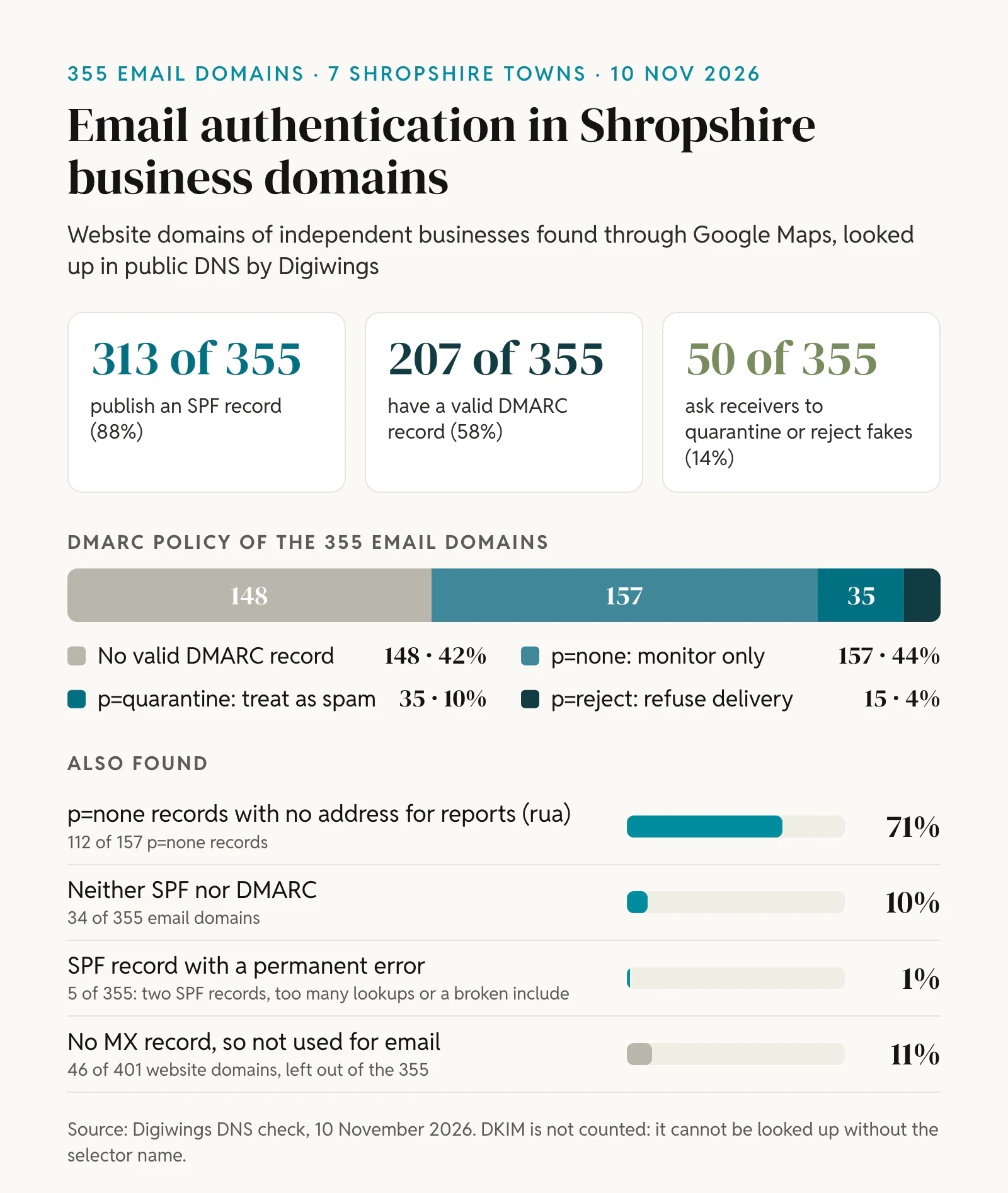
- SPF: 313 of 355 (88%). 42 had none. Five of the 313 records break the SPF rules: two records on one domain, more than 10 lookups, or an include pointing at a domain with no SPF record.
- DMARC: 207 of 355 (58%). 147 domains had no DMARC record, and one had two, which the standard says receivers discard.
- Policy: 157 domains (44%) were at
p=none, 35 (10%) at quarantine and 15 (4%) at reject. 112 of the 157p=nonerecords (71%) gave noruaaddress, so they ask for no action and get no reports. - Nothing at all: 34 domains (10%) had neither SPF nor DMARC.
The mail provider, identified from each domain's main MX record, made a clear difference:
| Mail provider | Email domains | SPF record | Valid DMARC | Quarantine or reject |
|---|---|---|---|---|
| Microsoft 365 | 100 | 100 (100%) | 68 (68%) | 30 (30%) |
| Google Workspace | 66 | 43 (65%) | 29 (44%) | 4 (6%) |
| Other provider or hosting company | 189 | 170 (90%) | 110 (58%) | 16 (8%) |
23 of the 66 Google Workspace domains had no SPF record, and 21 of those had no DKIM key under Google's default selector either. Google's minimum for every sender is SPF or DKIM, so if you use Google Workspace and never set up SPF, start there. Microsoft 365 domains all had SPF, but only 47 of 100 had published the two DKIM records Microsoft 365 uses to sign mail with the business's own domain. We can see those records, not the setting inside Microsoft 365.
Which sectors have DMARC set up?
Accountants, estate agents and solicitors were the most likely to have a DMARC record, and electricians and plumbers the least likely. Town made much less difference: between 52% of email domains in Whitchurch and 63% in Bridgnorth had one.
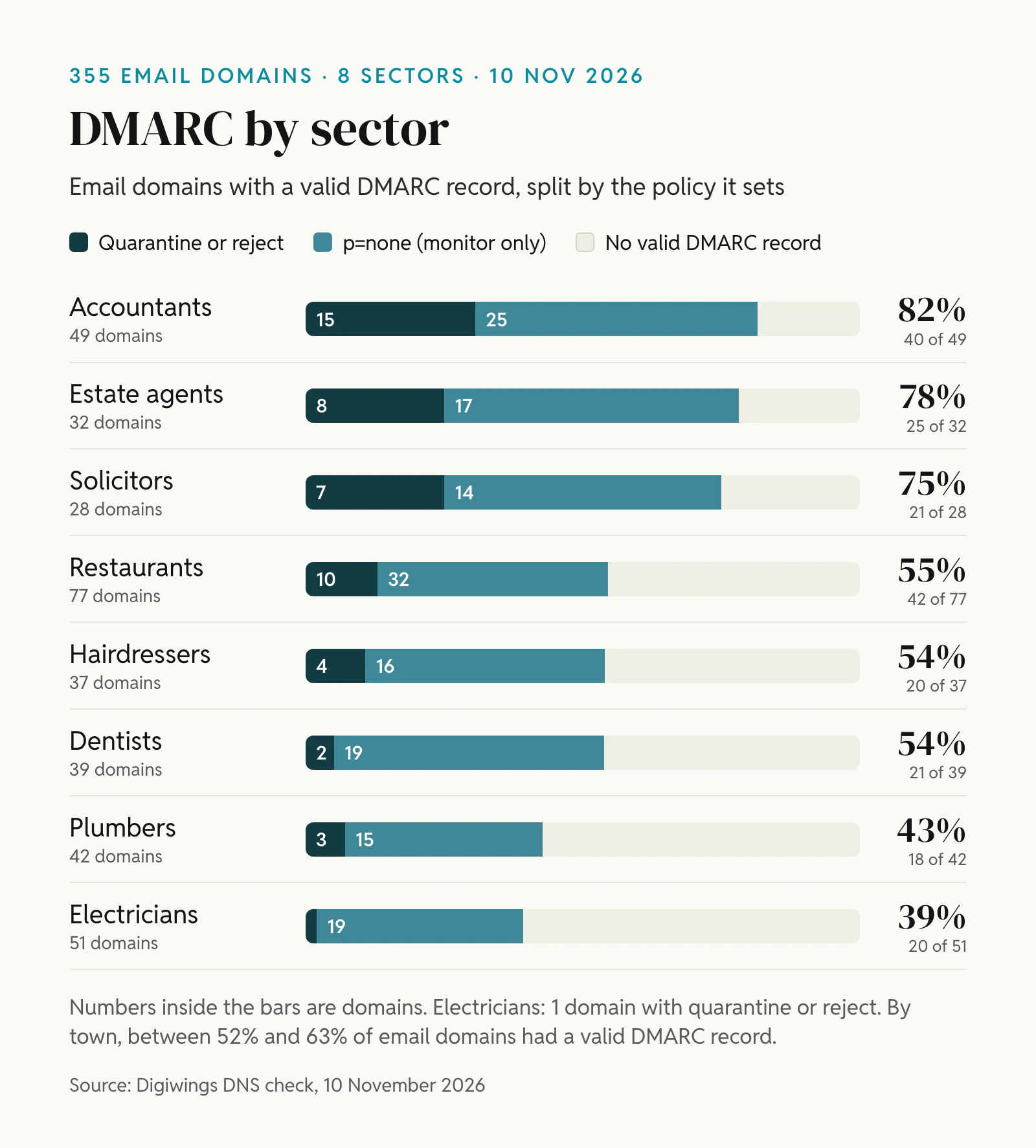
40 of 49 accountants (82%) had DMARC, 15 of them at quarantine or reject. Only 18 of 42 plumbers (43%) and 20 of 51 electricians (39%) had DMARC, and just 4 of those 93 trade domains had a policy that acts on fakes. The groups are small, but the gap is wide.
Our view: DNS cannot tell us why, but the gap falls where it hurts. Tradespeople email quotes to new customers who have never heard from them, and a quote in spam can mean a lost job.
How to check your own records
Free tools from Google and the UK's National Cyber Security Centre (NCSC) check your records in a minute, without changing anything.
- Google Admin Toolbox Check MX checks your MX and SPF records. Google recommends it for counting SPF lookups, and it has an optional DKIM selector field.
- NCSC Check your email security is free, needs no sign-up or personal details, and checks your domain's anti-spoofing and email privacy settings.
- A real message: send an email from your business address to a personal Gmail account, open it and choose More, then "Show original". Google's troubleshooting pages explain how to read the SPF and DKIM results there.
How to fix it safely: SPF, then DKIM, then DMARC
Set the records up in this order, one change at a time. A wrong DNS change can stop your email, so first find out who manages your domain's DNS: your web designer, IT company or domain registrar. Keep a copy of the current records and leave the MX records alone, as they deliver your incoming mail. If your website came as a monthly package, check who controls the domain (see pay-monthly websites versus buying outright).
- List everything that sends email as you: your mailbox provider, plus any website form, booking system, invoicing package or newsletter tool that uses your address.
- SPF: one record that covers them all. Start from your provider's record (Microsoft 365, Google Workspace) and add each extra service's
includeto it. Never add a second SPF record. Google says SPF can take up to 48 hours to start working. - DKIM: switch it on in your email service. In Google Workspace, generate a key in the Admin console, add it to DNS, then click "Start authentication". In Microsoft 365, create the two CNAME records the Defender portal shows, then turn signing on.
- DMARC: start at
p=nonewith reports. Add a TXT record named_dmarc, such as the example above, using a mailbox set aside for reports. Google says SPF and DKIM should run for at least 48 hours first, and its recommended rollout is to read reports for at least a week. The NCSC says reports should arrive within 24 hours. - Tighten to quarantine, then reject. When reports show your genuine mail passing, move to
p=quarantine, thenp=reject. The NCSC says many organisations reached reject about three months after quarantine, and advises watching reports for at least two weeks after. If genuine mail fails, step back.
Domains you own but never send from can be locked down straight away. For these "parked" domains, Microsoft recommends v=spf1 -all and v=DMARC1; p=reject;.
Our view: for a small business with one email service, the job is a few records and some patience. The risk is forgetting a sender, which is why the p=none stage with reports matters.
How can Digiwings help?
We build websites and run local SEO for Shropshire businesses from our studio in Shrewsbury. Tell us your domain and which service sends your email, and we will look up your SPF, DKIM and DMARC records free of charge and tell you in plain English what is missing and who needs to change what. If the website itself needs replacing, see our web design packages.
Frequently asked questions
Why are my emails going to spam in Gmail?
Gmail looks at whether your message is authenticated, how often people report your mail as spam, and how the message is built. Google requires every sender to use SPF or DKIM and recommends SPF, DKIM and DMARC. Check yours with Google's Check MX tool.
Why are my emails going to spam in Outlook?
Start with your SPF, DKIM and DMARC records. Since May 2025 Microsoft has required domains sending over 5,000 emails a day to Outlook.com, Hotmail and Live addresses to pass SPF and DKIM and publish DMARC. A recipient can also click "It's not junk" and add you to Safe senders.
Why are my emails suddenly going to spam?
Something has usually changed: a new tool sending as you that is missing from your SPF record, a second SPF record added by mistake, records lost when your DNS moved, or an expired domain. A large mailing from your everyday address can also trigger complaints.
Does DMARC require DKIM?
No. A message passes DMARC if either SPF or DKIM passes and matches the domain in the From address. Gmail, Yahoo and Outlook.com still require both SPF and DKIM from bulk senders, and DKIM copes better with forwarded mail, so set up both.
What is the difference between DKIM and DMARC?
DKIM adds a digital signature showing which domain sent a message and that it was not changed. DMARC is a policy record: it checks that the domain passing SPF or DKIM matches the From address people see, tells receivers what to do when it does not, and asks for reports.
Do small businesses need DMARC?
Gmail and Yahoo only require DMARC from senders of about 5,000 or more messages a day, so most small businesses are not obliged to have it. Google still recommends it for every sender. In our Shropshire check, 148 of 355 business email domains (42%) had no working DMARC record.
How we checked
The businesses are the sample from our indexing check: 411 independent businesses in eight sectors whose Google Maps listing named Shrewsbury, Telford, Oswestry, Bridgnorth, Ludlow, Market Drayton or Whitchurch and linked to a website. Removing "www." and merging branches left 403 domains; two shared website-builder or registry domains were dropped, leaving 401. On 10 November 2026 our script queried public DNS with dig, four lookups at a time with one retry, and recorded MX, SPF and DMARC records. We named the mail provider from the main MX host and counted SPF lookups as the SPF standard describes.
The limits matter. DKIM keys cannot be found without the selector name, so we only checked the default names Google Workspace and Microsoft 365 use. DNS shows what a domain publishes, not whether real messages pass or land in the inbox. A filtering service in front of Microsoft 365 or Google Workspace counts as "other". Town figures count a domain in each town where it had a listing. As a cross-check, a third-party audit tool used in our 9 November check reported no DMARC record for 150 of the 333 sites it measured; on the 323 domains both checks covered, our lookup agreed for 309. We publish only totals, never business or domain names, in our email authentication check data (CSV, CC BY 4.0).
Sources
Our own data was collected on 10 November 2026. Google, Yahoo, Microsoft, NCSC and standards pages were checked on 10 November 2026.
- Digiwings, Email authentication check of Shropshire business domains, November 2026 (CSV, CC BY 4.0), and Local search readiness, November 2026 (CSV, CC BY 4.0).
- Gmail Help, Email sender guidelines, Email sender guidelines FAQ and Report spam in Gmail.
- Google Workspace Help, Gmail spam and authentication.
- Google Workspace Help, Set up SPF, Set up DKIM, Set up DMARC and Recommended DMARC rollout.
- Google Workspace Help, Troubleshoot SPF issues, Troubleshoot DKIM issues and Troubleshoot DMARC issues.
- Google Admin Toolbox, Check MX.
- Yahoo Sender Hub, Sender Requirements and Recommendations.
- Microsoft Tech Community, Strengthening Email Ecosystem: Outlook's New Requirements for High-Volume Senders (2 April 2025, updated 29 April 2025).
- Microsoft Learn, Set up SPF to identify valid email sources for your Microsoft 365 domain, How to use DKIM for email in your custom domain and Set up DMARC to validate email in Microsoft 365.
- Microsoft Support, Mail goes to the Junk folder by mistake.
- National Cyber Security Centre, Email security and anti-spoofing, including Implement a DMARC policy of none and Reject spoof emails (version 2.0, 7 October 2019).
- National Cyber Security Centre, New email security tool launched to help organisations check their defences (10 May 2022), and Check your email security.
- IETF, RFC 7208: Sender Policy Framework (SPF) (April 2014).
- IETF, RFC 9989: Domain-Based Message Authentication, Reporting, and Conformance (DMARC) (May 2026).
Illustration and charts: Digiwings.